


Affiliate Disclosure: FactsnFigs is reader-supported. When you deploy cloud servers, automation tools, or software infrastructure through links on our site, we may earn an affiliate commission at no extra cost to you.
B2B lead enrichment platforms and cloud scraping APIs have become one of the fastest-growing recurring expenses for modern agencies and solo founders. Paying per credit to extract public company directories, founder profiles, and tech-stack signals quickly erodes margins once your outbound pipeline scales past a few thousand prospects per month.
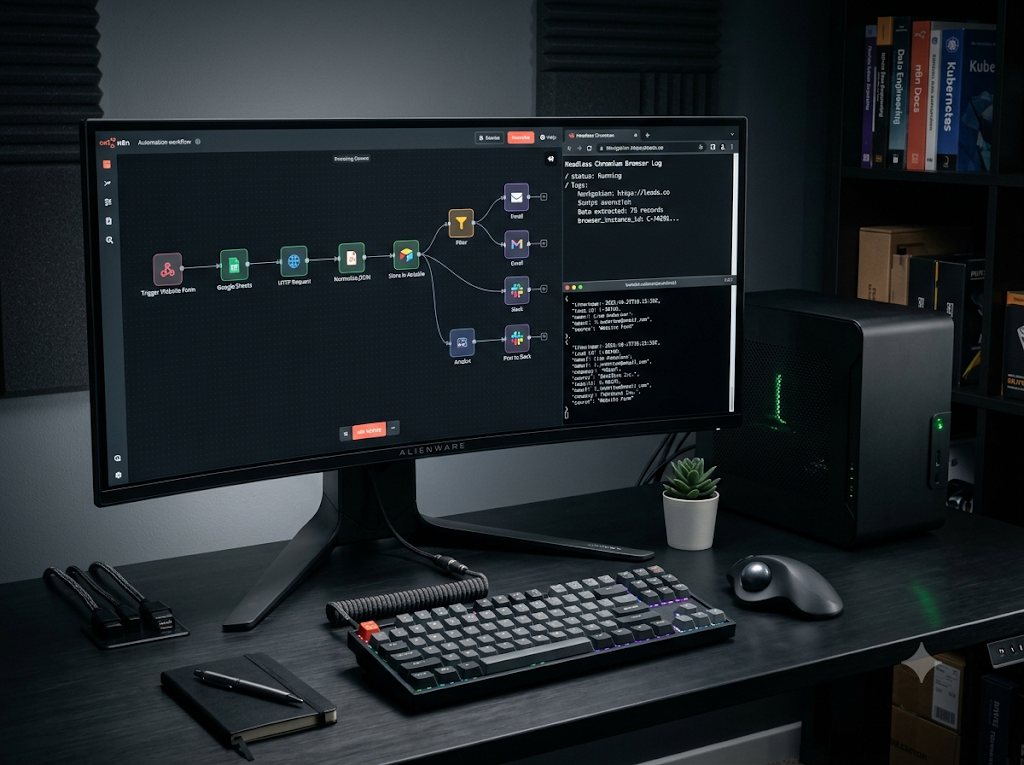
Building an autonomous lead generation n8n pipeline solves this unit-economics bottleneck permanently. By combining self-hosted n8n orchestration with Browserless headless Chromium containers and Ollama local language models, you can render modern JavaScript-heavy websites, strip noisy HTML, and parse structured B2B prospect records directly into your CRM with zero recurring token or scraping credit fees.
Expanding on our foundational architecture for autonomous AI workflows with n8n and local LLMs and private task orchestration across 2026 digital economy trends, this technical guide provides the exact Docker configuration, REST API payloads, and JSON schema rules needed to run a private enrichment engine.
Quick Comparison: Commercial SaaS Scrapers vs. Self-Hosted n8n Stack (2026)
| Operational Vector | Commercial Cloud Enrichment (Clay / Apollo / Cloud Scrapers) | Self-Hosted n8n + Browserless + Local LLM |
| Monthly Cost (10,000 Leads) | $350 – $900+/month (Credit tiers + LLM token markups) | $24 – $45/month (Fixed VPS compute cost only) |
| JavaScript SPA Rendering | Handled via managed proxy pools | Native headless Chromium via ghcr.io/browserless/chromium |
| CSS Selector Fragility | High when scraping custom directory layouts | Immune (Local LLM parses raw Markdown/text semantically) |
| Data Privacy & Compliance | Prospect lists routed through third-party SaaS logs | 100% self-contained inside private VPC / local hardware |
| Output Formatting | Proprietary CSV / platform-locked schemas | Deterministic JSON Schema validated directly into PostgreSQL / CRM |
| Maintenance Overhead | Zero infrastructure management | Initial 20-minute Docker Compose deployment |
1. End-to-End Pipeline Architecture
Traditional web scrapers break the moment a target directory changes a CSS class name or switches from static HTML to a React/Next.js Single Page Application (SPA). This architecture separates page rendering from semantic extraction:
[Trigger: Scheduled Cron / New Domain Webhook in n8n]
                         │
                         ▼
[Node 1: HTTP Request -> Self-Hosted Browserless (/chromium/content)]
         • Executes JavaScript & waits for network idle
         • Returns fully hydrated DOM HTML
                         │
                         ▼
[Node 2: n8n HTML/Markdown Cleaner (Code / HTML Node)]
         • Strips <script>, <style>, <svg>, and nav footers
         • Compresses payload by ~85% to fit local context windows
                         │
                         ▼
[Node 3: Ollama Chat Model + Structured Output Parser]
         • Enforces strict JSON Schema at temperature = 0
         • Extracts Decision Maker, Role, Company Niche & Pain Points
                         │
                         ▼
[Node 4: Deduplication & CRM Upsert (PostgreSQL / HubSpot / Airtable)]
- Headless Rendering Layer (Browserless): Instead of brittle
curlrequests that get blocked or return empty<div id="root"></div>shells, n8n dispatches target URLs to a containerized Chromium instance. - DOM Compression Layer (n8n): Raw web pages frequently exceed 150,000 tokens due to inline SVGs and tracking scripts. Stripping non-content tags in n8n reduces the page to 1,500–3,000 clean tokens before inference.
- Deterministic Parsing Layer (Ollama): A quantized local model (such as
qwen2.5:14bor a distilled reasoning checkpoint from our local DeepSeek R1 setup guide) reads the cleaned text and outputs validated JSON matching your exact CRM fields.
2. Deploying the Self-Hosted Stack via Docker Compose
To run n8n and Browserless side by side on a single Linux VPS (minimum 4 vCPU, 16GB RAM) or local workstation, deploy both containers inside an isolated Docker bridge network.
Create a docker-compose.yml file in your deployment directory:
YAML
version: "3.8"

services:
  n8n:
    image: docker.n8n.io/n8nio/n8n:latest
    container_name: n8n-orchestrator
    restart: unless-stopped
    ports:
      - "5678:5678"
    environment:
      - N8N_HOST=localhost
      - N8N_PORT=5678
      - N8N_PROTOCOL=http
      - NODE_ENV=production
      - EXECUTIONS_DATA_PRUNE=true
      - EXECUTIONS_DATA_MAX_AGE=168
    volumes:
      - n8n_data:/home/node/.n8n
    networks:
      - lead_pipeline_net

  browserless:
    image: ghcr.io/browserless/chromium:latest
    container_name: browserless-engine
    restart: unless-stopped
    ports:
      - "3000:3000"
    environment:
      - CONCURRENT=5
      - QUEUED=20
      - TOKEN=replace_with_strong_random_token
      - TIMEOUT=30000
    shm_size: "2gb"
    networks:
      - lead_pipeline_net

volumes:
  n8n_data:

networks:
  lead_pipeline_net:
    driver: bridge
Key Configuration Guardrails
TOKENAuthentication: Always set an explicitTOKENenvironment variable on Browserless. Without a token, the container leaves its/functionand/contentendpoints unauthenticated.shm_size: "2gb": Headless Chromium relies heavily on/dev/shmshared memory. Docker’s default 64MB allocation causes Chromium tabs to crash mid-scrape on heavy modern websites.- Internal Host Resolution: Because both containers share
lead_pipeline_net, n8n can call Browserless directly athttp://browserless:3000without exposing port3000to the public internet.
3. Rendering Dynamic Pages via Browserless REST API
Inside your n8n workflow, add an HTTP Request node immediately after your URL source (Google Sheets, CSV import, or RSS/Sitemap monitor).
Configure the HTTP Request node with the following parameters:
- Method:
POST - URL:
http://browserless:3000/chromium/content?token=replace_with_strong_random_token - Headers:
Content-Type: application/json - JSON Body:
JSON
{
  "url": "{{ $json.target_website_url }}",
  "waitForSelector": {
    "selector": "body",
    "timeout": 10000
  },
  "gotoOptions": {
    "waitUntil": "networkidle2",
    "timeout": 25000
  },
  "rejectResourceTypes": [
    "image",
    "media",
    "font",
    "stylesheet"
  ]
}
Why rejectResourceTypes Matters
Blocking images, fonts, video, and CSS stylesheets inside Browserless cuts page load latency by up to 60% and reduces outbound proxy bandwidth consumption by nearly 80%, while still allowing client-side JavaScript bundles to hydrate all text and contact metadata in the DOM.
Stripping HTML Noise Before LLM Inference
Add an n8n Code node (JavaScript) right after the Browserless node to convert the raw HTML into compact, high-signal text:
JavaScript
const html = $input.first().json.data || "";

// Remove script, style, svg, and noscript blocks
let cleaned = html
  .replace(/<script[\s\S]*?<\/script>/gi, " ")
  .replace(/<style[\s\S]*?<\/style>/gi, " ")
  .replace(/<svg[\s\S]*?<\/svg>/gi, " ")
  .replace(/<[^>]+>/g, " ")
  .replace(/\s+/g, " ")
  .trim();

// Cap payload to ~12,000 characters (~3,000 tokens) for fast local inference
return [
  {
    json: {
      source_url: $('HTTP Request').first().json.url,
      clean_text: cleaned.slice(0, 12000)
    }
  }
];
4. Deterministic Extraction with Local LLMs & JSON Schema
Standard LLM prompts often fail in automated pipelines because the model wraps JSON inside conversational markdown blocks (```json ... ```) or invents inconsistent field names. Both Ollama and n8n natively eliminate this failure mode through Schema-Enforced Structured Outputs.
Method A: Using n8n’s Native AI Chain + Structured Output Parser
- Add a Basic LLM Chain node to your workflow.
- Attach the Ollama Chat Model sub-node pointed at your local or LAN Ollama endpoint (
[http://host.docker.internal:11434](http://host.docker.internal:11434)), selectingqwen2.5:14borllama3.1:8bwith Temperature set to0. - Enable Require Specific Output Format and attach the Structured Output Parser sub-node using Define using JSON Schema:
JSON
{
  "type": "object",
  "properties": {
    "company_name": { "type": "string" },
    "primary_industry": { "type": "string" },
    "target_audience": { "type": "string" },
    "public_contact_email": { "type": ["string", "null"] },
    "key_decision_makers": {
      "type": "array",
      "items": {
        "type": "object",
        "properties": {
          "name": { "type": "string" },
          "title": { "type": "string" }
        },
        "required": ["name", "title"]
      }
    },
    "has_enterprise_pricing": { "type": "boolean" },
    "qualification_score": { "type": "integer", "minimum": 1, "maximum": 10 }
  },
  "required": [
    "company_name",
    "primary_industry",
    "target_audience",
    "has_enterprise_pricing",
    "qualification_score"
  ]
}
Method B: Direct Ollama /api/chat Schema Enforcement
If you prefer calling Ollama directly via an HTTP Request node without LangChain wrappers, pass the exact same schema inside the native "format" parameter:
JSON
{
  "model": "qwen2.5:14b",
  "stream": false,
  "options": {
    "temperature": 0
  },
  "format": {
    "type": "object",
    "properties": {
      "company_name": { "type": "string" },
      "qualification_score": { "type": "integer" }
    },
    "required": ["company_name", "qualification_score"]
  },
  "messages": [
    {
      "role": "system",
      "content": "Extract structured B2B lead intelligence strictly from the provided text. Never fabricate email addresses."
    },
    {
      "role": "user",
      "content": "{{ $json.clean_text }}"
    }
  ]
}
If you are already running multi-step agent logic from our private AI agent tutorial for daily tasks, you can chain a second verification node that automatically routes prospects scoring 8 or above into your CRM’s high-priority outreach queue.
5. Rate Limiting, Compliance Hygiene & Monthly ROI Math
An autonomous scraper without concurrency guardrails will quickly trigger IP bans or overwhelm local CPU/GPU memory. Enforce these four operational controls:
- Batch Pacing in n8n: Wrap your URL list inside a Split In Batches node (Batch Size:
1) paired with a Wait node set to a randomized delay between4and9seconds between requests. - Respect
robots.txt& Public Endpoints: Configure your pipeline strictly for publicly accessible company websites, press releases, and open business directories. Never automate authenticated logins or bypass paywalled databases. - Null-Safe Email Rules: Instruct the model to return
nullwhenever an explicit business contact email is absent on the page—preventing hallucinatedinfo@guesses that damage domain sender reputation during outreach.
Monthly Unit Economics (10,000 Enriched Company Profiles)
| Cost Component | Cloud SaaS Enrichment Stack | Self-Hosted n8n + Browserless + Ollama |
| Orchestration & Workflows | $50 – $120/mo (Hosted automation tiers) | $0 (Self-hosted n8n Community Edition) |
| Headless Browser Rendering | $150 – $300/mo (Managed scraping APIs) | $0 (Self-hosted ghcr.io/browserless/chromium) |
| LLM Extraction & Structuring | $150 – $480/mo (Cloud API credits) | $0 (Local Ollama inference) |
| Underlying Compute Infrastructure | Included in SaaS markup | ~$30/mo (Dedicated KVM VPS / Local Mac Mini) |
| Total Monthly Outlay | $350 – $900+/month | ~$30/month (91%+ Cost Reduction) |
Relying on metered cloud scrapers and expensive frontier APIs to parse public company websites is an unnecessary drag on agency profitability. By deploying n8n, Browserless, and Ollama with strict JSON Schema validation, you turn lead research into a deterministic, zero-marginal-cost asset that runs quietly in the background. Set up the Docker Compose stack, enforce batch pacing, and keep your CRM populated with clean, structured prospect intelligence without paying per-credit SaaS taxes.


